
Wix, Squarespace or WordPress for a Tradesman's Website

Search "wix vs squarespace" and you get comparisons written for photographers, online shops and bloggers. When we checked in September 2026, none of the top ten results talked about trades.
This one is for a plumber, sparky or roofer running the business from a van. It compares the three on what matters to you: speed on a phone, local search basics, tap-to-call, ownership, leaving later, and how much of your evening each one eats.
Every platform fact below comes from that platform's own pages, checked on 26 September 2026.
The short version
- For a one-person trade, Wix or Squarespace both do the job. The builder matters less than your phone number, photos and service pages.
- In HTTP Archive's Web Almanac 2025, 74% of Wix sites, 69% of Squarespace sites and 45% of WordPress sites passed Core Web Vitals on real mobile visits.
- All three can do tap-to-call, contact forms and local business markup. Only WordPress lets you pick the whole site up and move it to another host.
- Wix says plainly that your site must run on Wix's servers. Squarespace exports only part of a site.
- We have not quoted prices. They change often and vary by where you view them, so check the renewal cost on each official page.
Wix vs Squarespace: which is better for a tradesman?
For most sole traders, neither is clearly better. Both host the site for you, give you tap-to-call and forms, and add local business markup automatically. Wix did slightly better on Google's mobile speed and stability checks in 2025 and lets you edit that markup. Squarespace's markup is fixed. Pick the editor you find easier to use.
How the three compare on what makes your phone ring:
| What matters to a trade | Wix | Squarespace | WordPress |
|---|---|---|---|
| Mobile sites passing Core Web Vitals (HTTP Archive, 2025) | 74% | 69% | 45% |
| Local business markup | Added automatically, editable | Added automatically, not editable | Depends on your theme or plugin |
| Tap-to-call | Numbers become clickable automatically | Phone option in the link editor | Yes, with a phone link |
| Move the whole site to another host | No | No, partial export only | Yes |
| Who does the software updates | Wix | Squarespace | You (WordPress.org) or WordPress.com |
"WordPress" means two different products. WordPress.org is free, open source software that you install on hosting you pay for. WordPress.com is a hosted service run by a company, closer to Wix in how it works. The speed figures above cover WordPress sites of every kind.
Which one is fastest on a phone?
On real-world mobile data, Wix came out ahead, Squarespace close behind and WordPress well back. According to HTTP Archive's Web Almanac 2025, 74% of Wix sites, 69% of Squarespace sites and 45% of WordPress sites had good Core Web Vitals on mobile. The gap is real, but it measures the average site, not yours.
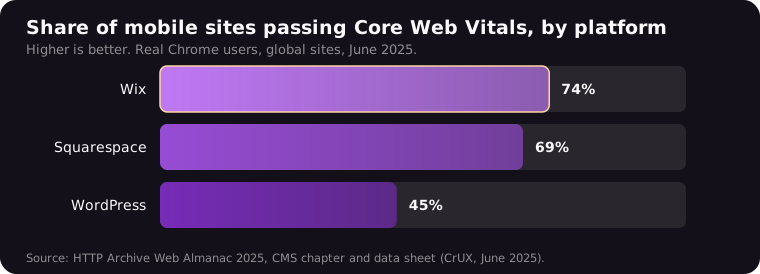
The figures come from the HTTP Archive's Web Almanac 2025, CMS chapter. The chapter text gives Wix and WordPress; Squarespace's 69% is in its published data sheet. Core Web Vitals are Google's measures of loading speed, responsiveness and whether the page jumps about. The Almanac's chart is labelled as Chrome UX Report data. Its methodology page says that release captured sites visited by Chrome users during June 2025.
That is a 29-point gap from Wix to WordPress (74 minus 45), and 5 points from Wix to Squarespace (74 minus 69).
Read that number carefully
It is a global crawl, not a UK trades sample. It does not adjust for hosting, plugins or how carefully the site was built. A lean WordPress site on decent hosting can be quick. A Wix site packed with video can crawl. "WordPress sites pass less often" is fair. "WordPress is slow" is not.
Keep speed in proportion. Google's page experience guidance, updated 22 September 2026, says "Google Search always seeks to show the most relevant content, even if the page experience is sub-par." Speed helps you win a close contest. It will not rescue a site that says nothing about what you do or where.
Do all three handle local SEO basics?
Yes, the basics are covered on all three. Wix and Squarespace both add local business markup automatically, the behind-the-scenes code that tells Google your business name, address and contact details. WordPress leaves it to your theme or an SEO plugin. None of them will write your service pages for you, and that is where rankings come from.
On Wix, the local business markup help page says: "When you add a business name and location to your account, Wix automatically creates Local Business markup for your site's homepage and adds it for you." You can edit it.
Squarespace's page on how it optimises your site for search lists "Local business" among the schemas it generates, then adds: "which you can't edit or remove". Fine if your details are right.
On WordPress, what you get depends on the theme and plugins you choose. That is more control and more to get wrong.
What actually moves the needle
The technical floor is handled by all three. What separates you from the next plumber is one page per money job, written for your areas. Our guide to the service page structure that ranks locally walks through it, and why small business websites fail at local search covers the usual gaps.
Can customers tap to call and send you a job?
All three can. On Wix, a phone number typed into a text box becomes clickable automatically. On Squarespace you set a phone link in the link editor. Contact forms are built into both, and WordPress.com has a Form block. The practical difference is where form enquiries end up and whether you will actually see them.
Wix's clickable phone number guide says: "When you enter your number into a text box, it automatically becomes clickable." Wix form entries are stored in a submissions table in your dashboard, according to its Wix Forms help page.
Squarespace's links guide has a detail UK trades will trip over. It tells you to enter the country code and area code and "Don't include 0 at the beginning of the number, as this may prevent the link from working." So a UK mobile goes in starting with the 44 country code, without the leading 0. Test it from your phone.
Squarespace forms need somewhere to send enquiries. Its form storage page says: "At least one storage option is required per form." Send them to an email you actually check.
Once calls come in, tracking which ones came from Google is a separate job.
Who owns the site, and can you leave later?
You own your content on all three, but only WordPress lets you take the whole working site elsewhere. Wix says your site must run on its servers. Squarespace exports some pages and blog posts, not the design. Your domain can move away from any of them, provided you control it and wait out the lock after registering it.
Wix
Wix's page on exporting your site is admirably blunt: "Since Wix is a SaaS solution, your site must run on Wix's servers." It adds: "the content you build on Wix belongs to you." Words and photos you upload are yours. Wix's templates and stock images stay with Wix, and the working site is not portable.
Changing the look is limited too. Its template guide says "it's not possible to switch to a different template for a site you already created". You start a new site and bring content across.
Squarespace
Squarespace's export guide, updated February 2026, says "Not everything will export, as many features rely on our platform's JavaScript and CSS." Layout pages, one blog, text and image blocks export. Index pages, store pages, video blocks, style settings and custom CSS do not.
WordPress
WordPress.org is licensed under the GPL, which its about page describes as including "the freedom to run the program for any purpose." Any host can run it. Even WordPress.com supports moving a full site, themes and plugins included, to another host, on an eligible plan.
The domain is the part that really matters
Your domain carries your email, your Google Business Profile link and every citation pointing at you. All three let you transfer it out. Wix's domain transfer page notes ICANN's rule that "You cannot transfer a domain within 60 days of purchase." Squarespace's transfer guide emails the code to "the domain registrant". Make sure that registrant is you, not whoever set the site up.
How much time will each one take to look after?
Wix and Squarespace take the least. They host the site and handle the software, so your job is keeping the phone number, photos and services current. WordPress.org hands you the updates. Security fixes to WordPress itself install automatically on most sites, but plugins and themes need watching unless you switch auto-updates on for each one.
WordPress's own updating guide says: "For WordPress 3.7+, you don't have to lift a finger to apply minor and security updates." Its plugin and theme auto-updates page says those became opt-in "theme by theme and plugin by plugin" from version 5.5.
The test that beats any feature list: can you log in from your phone on a Tuesday night and change your number in five minutes? Try each one and time yourself.
What will each one cost you?
Wix lets you build a site for free, but you need a paid Premium plan to use your own domain and remove Wix branding. Squarespace has no free plan, only a 14-day trial. On Wix, Squarespace and WordPress.com, the free domain covers the first year only. Check whether the price you see includes VAT.
We have not quoted figures, because prices change and vary by where you view them. Check each official page: Wix plans, Squarespace pricing and WordPress.com pricing. Compare like with like.
- Renewal price after year one, not the introductory offer.
- The domain after the free year.
- VAT. Wix says its prices exclude tax, which depends on your billing address.
- Monthly or annual billing. WordPress.com's free domain comes only with annual or multi-year plans.
The domain small print matters. Wix's voucher, on most Premium plans, "is only valid with a purchase of a new domain from Wix and cannot be used to renew or extend a domain you already own". Squarespace says its free domains "will renew at our standard rate, plus applicable taxes, after the first year".
WordPress.org itself is free, but you pay separately for hosting and a domain.
So which should you pick?
Pick by situation, not by brand. A sole trader who wants a tidy site this month should use whichever of Wix or Squarespace feels easier to edit. A business planning many service and area pages, or wanting to leave cleanly one day, is better on WordPress, properly looked after.
- Sole trader, one or two services, one area: Wix or Squarespace. Give each an evening on its free plan or trial. Keep the one you can update from your phone.
- Photo-heavy trades such as landscaping or kitchens: either works, but watch the weight. HTTP Archive's Web Almanac 2025 data sheet put Squarespace's median mobile page at 3,974 KB, against 2,894 KB for WordPress and 2,577 KB for Wix. Check yours loads quickly once the photos are in.
- Several trades or towns, lots of service pages, plans to hire help: WordPress. More control and full portability, but only if someone keeps it updated.
- You already have a site that brings in calls: stay put for now. Moving means rebuilding every page and redirecting the old addresses. Improve the pages you have first.
Whichever you choose, the builder is the smaller decision, and what a good tradesman website actually needs is the same on all three.
What to do this week
- Check who owns your domain. Look up the registrant in your builder or registrar dashboard. If it is your web designer, get it moved into your name.
- Tap your own phone number on your site from your mobile. If nothing happens, fix the link first.
- Send yourself a test enquiry through your contact form and see where it lands.
- Run your homepage through PageSpeed Insights on mobile and note whether it passes Core Web Vitals.
- Starting fresh? Try Wix's free plan and Squarespace's 14-day trial. Time how long each takes to change your number.
- Write down the renewal price for your plan and domain, and put the renewal date in your phone.